Compliance Reports and Scheduled Exports
Generate, schedule, and export structured compliance and operational reports for your KYC/B verification activity using Certivant Reports.
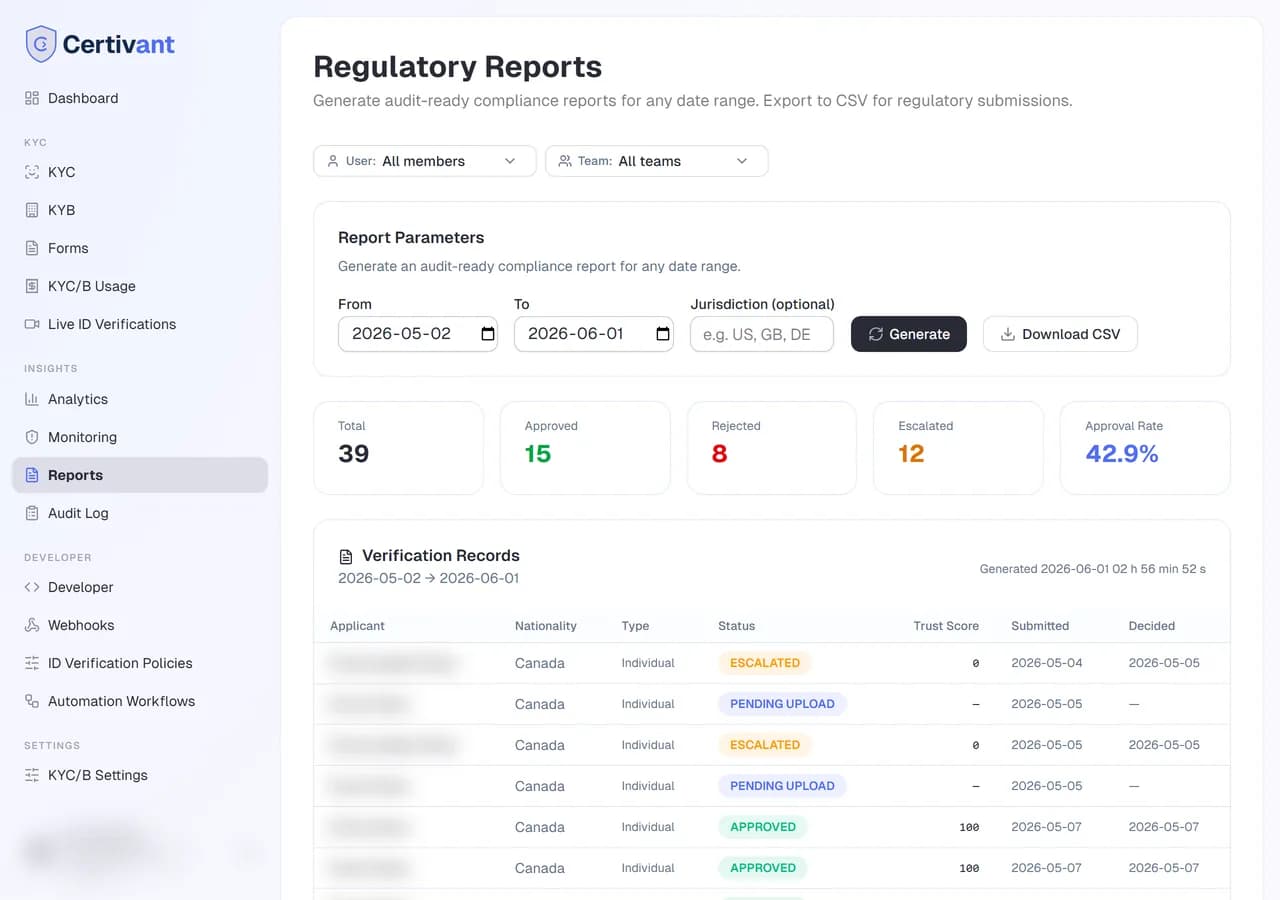
What it does
Reports are structured exports of your verification activity — formatted for compliance review, regulator submissions, or month-end internal reconciliation. They're different from Analytics (live charts) and from the per-request audit log (single-applicant detail):
- Analytics — live visual exploration.
- Audit log — one-applicant-at-a-time forensics.
- Reports — bulk, structured, exportable, schedulable.
Where it lives
Insights → Reports in the left sidebar.
Built-in reports
The system ships with several pre-built report templates:
| Report | What it includes | Use case |
|---|---|---|
| KYC summary | Counts by status, average processing time, approval rate, top failure reasons. Per day, week, or month. | Monthly compliance pack. |
| KYB summary | Same shape as KYC but for business verifications, plus beneficial-owner KYC roll-up. | Quarterly board pack. |
| Sanctions screening | Every sanctions hit, false-positive rate, time-to-resolve. | Regulator inspections. |
| Manual review audit | Every escalated/manually-decided request with reviewer + note. | Internal audit / four-eyes review. |
| High-risk applicants | Every applicant with a risk score above your threshold, with the contributing factors. | Senior reviewer queue, enhanced DD prioritisation. |
| Per-team performance | Volume and approval rate per team. | Operational management of multi-team agencies. |
| Per-agent performance | Volume and approval rate per individual member. | Coaching, payroll-tied performance reviews. |
| PEP changes | Every PEP status change detected by monitoring. | AML compliance documentation. |
| Document expiry | Applicants whose IDs expire in the next N days. | Outreach planning. |
Running a report
Pick the report
From the templates list on the Reports page, click the one you want.
Set parameters
Every report has a parameters panel:
- Date range (always present).
- Format — PDF (formatted, suited for sharing), CSV (machine-readable), or JSON (for programmatic ingestion).
- Report-specific filters (e.g., country, team, risk threshold).
- Sub-tenant — partner orgs only. Scope the report to one of your end customers (the sub-tenant tag set on requests via the API). See partner attribution.
Click Generate
Small reports complete in seconds and appear inline. Large reports (e.g. a year of data with 50k requests) run in the background and email you a download link when ready.
Download or share
PDFs include your white-label branding, so they're sharable with auditors and regulators without exposing Certivant chrome.
Scheduled reports
For recurring needs (e.g. monthly compliance pack), schedule a report:
Generate the report once with your desired parameters.
Click Schedule on the result page.
Set the cadence (daily / weekly / monthly / quarterly) and the email recipients (one or more org members or external email addresses).
The system auto-runs the report on schedule and emails the file to each recipient.
Scheduled reports appear under Reports → Scheduled. Pause, edit, or delete from there.
Custom reports
If the built-in templates don't fit, the Custom report button lets you compose your own:
- Pick which data tables to draw from (requests, applicants, checks, alerts, audit log).
- Pick which columns to include.
- Apply filters.
- Group by any column (organization, country, status, owner).
- Aggregate (count, average, sum) selected metrics.
Save as a named report template — appears alongside the built-ins for next time.
Exporting raw data
The Raw export button on each report's results page produces a no-formatting CSV of the underlying records, including any computed columns. Useful when you want to import the data into your own BI tool (Looker, Metabase, Power BI, etc.) for joining with other data.
Compliance considerations
Reports include personally-identifiable information by default. Be careful where you send them:
- PDF/CSV/JSON outputs are not encrypted at rest. Store them in a secure location.
- Scheduled reports are emailed in plain text by default. For high-sensitivity recipients, use the per-report Secure-link option — recipients get a one-time link that requires them to log into Certivant to download.
- The audit log records every report generation and download. Anyone with access to Audit log can see who exported what.
Troubleshooting
A report shows zero rows
Two common causes:
- Your filters are too narrow (date range too short, team filter excludes all data).
- You're a member viewing a report scoped to data you can't see (per the org's data-isolation rules).
A scheduled report stopped arriving
Open Reports → Scheduled. Status will be one of:
active— running.failed— the last run errored. Click for details.paused— manually paused.disabled— auto-disabled after 3 consecutive failures.
PDF formatting looks broken
The PDF generator handles up to ~10k rows cleanly. Past that, use CSV instead.
Related
- Analytics — live charts vs. exportable snapshots.
- Audit log — per-applicant evidence trail.
- Monitoring — ongoing alerts; reports can summarise them.
Ongoing Monitoring and AML Alerts
Continuously screen approved applicants for sanctions hits, adverse media, and PEP status changes using Certivant ongoing monitoring and the alert queue.
Audit Log — Tamper-Evident Compliance Trail
Search, filter, and export the Certivant audit log — a tamper-evident, append-only history of every KYC/B action for regulatory inspections and internal investigations.