Audit Log — Tamper-Evident Compliance Trail
Search, filter, and export the Certivant audit log — a tamper-evident, append-only history of every KYC/B action for regulatory inspections and internal investigations.
What it does
The audit log is the append-only history of every meaningful action in your organization. Every verification request, every document upload, every decision (auto or manual), every settings change, every membership change, every webhook fire — it all lands here with a timestamp, an actor, and the affected resource.
You can search, filter, and export. Regulators love this page; so should you.
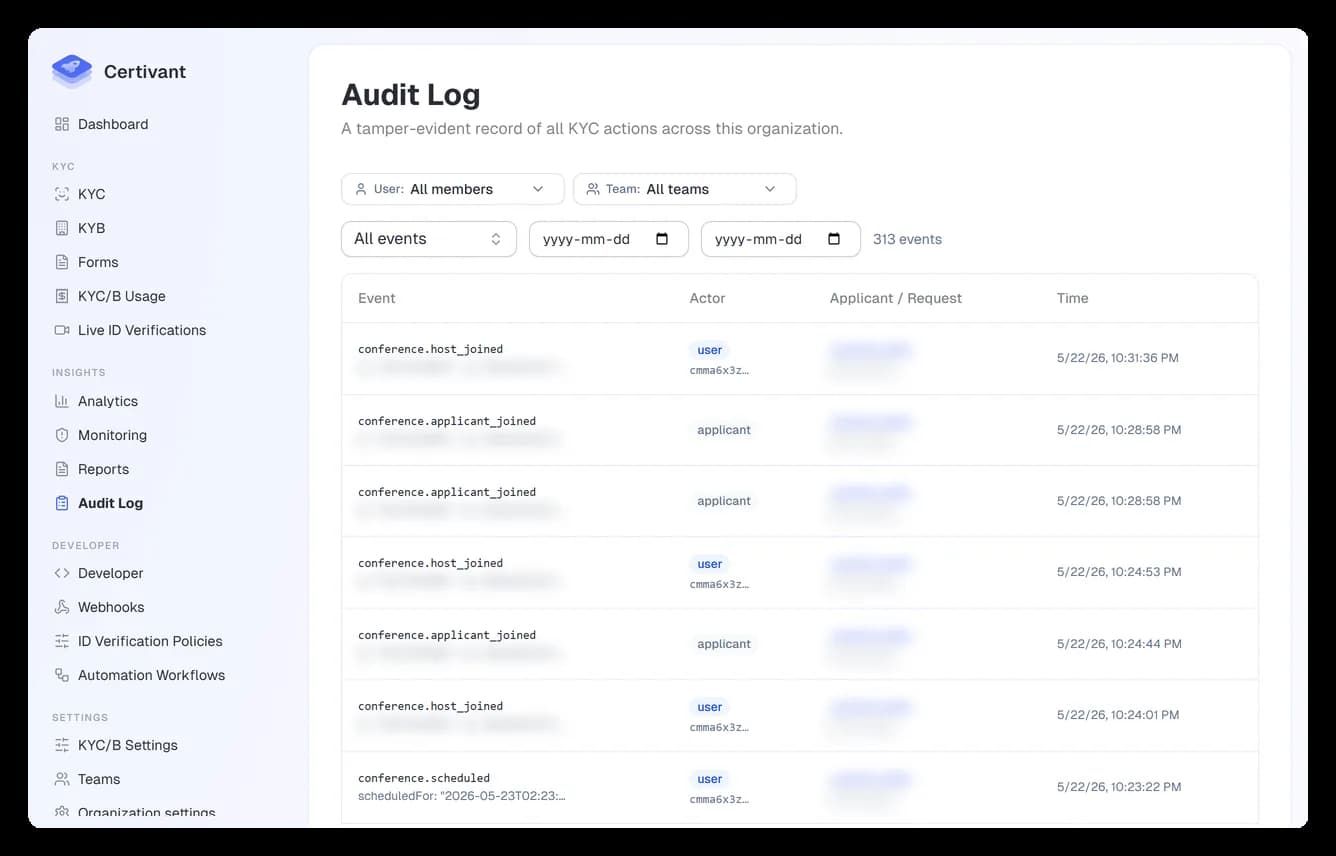
Where it lives
Insights → Audit log in the left sidebar.
There's also a per-applicant audit log inside each verification request's detail page — that one is scoped to just that applicant's events.
What's logged
Some examples (not exhaustive):
| Event | Fields recorded |
|---|---|
kyc.request.created | request id, applicant id, type, externalRef, source (dashboard / API / public form) |
kyc.request.approved (auto) | request id, automated checks that contributed, score |
kyc.request.approved (manual) | request id, reviewer user id, review note |
kyc.request.rejected | same, with rejection reason |
kyc.request.escalated | request id, who escalated, why |
document.uploaded | document id, type, side, file size, OCR provider used |
document.reanalyzed | document id, who triggered, provider used |
decision.bulk | requests list, decision, reviewer note |
form.published | form id, version, who published |
member.added, member.removed, member.role_changed | user id, by-user id, before/after role |
settings.kyc_provider.changed | which provider key, old, new, by-user id |
webhook.fired, webhook.failed | event type, target URL, status code, retry count |
monitoring.alert.created, monitoring.alert.resolved | applicant id, alert type, severity, reviewer note |
auth.signed_in, auth.signed_out, auth.password_changed, auth.2fa_enabled | user id, IP, user-agent |
The page
Filters
- Date range — defaults to last 7 days. Widen for older events.
- Search — matches actor name + event-type code + resource id.
- Event type — multi-select dropdown of every known event.
- Actor — limit to one user / API key.
- Resource — limit to one applicant / request / form.
- Sub-tenant — partner orgs only. Appears once requests carry sub-tenant tags; limits the log to one of your end customers. (See partner attribution.)
Rows
Each row shows:
| Column | Notes |
|---|---|
| Timestamp | ISO 8601 with timezone. Hover for "X hours ago." |
| Actor | User name (or API key {prefix}… for programmatic actions, or "system" for automated jobs). |
| Event | The event-type code (e.g. kyc.request.approved). |
| Resource | Click to open the affected applicant/request/form. |
| IP | Where the actor's request came from. |
| Note | If the event recorded a free-text note (review notes, change reasons), it's previewed here. |
Row detail
Click any row for the full payload — including before/after snapshots for change events. The detail panel also shows related events (other actions on the same resource around the same time) so you can reconstruct what happened during an incident.
Exporting
The Export button (top-right) produces a CSV or JSON dump scoped to your current filters. Useful for regulator submissions, internal investigations, or piping into a SIEM.
For automated piping (e.g., shipping events to Splunk continuously), set up the audit-log webhook under Settings → KYC/B → Webhooks instead of polling this page.
Tamper-evidence
Audit log entries are append-only. You can't edit or delete them via the UI — there's no "undo" button. This is by design: an audit log you can edit is a log you can't trust.
If a row is genuinely wrong (e.g., the wrong reviewer recorded due to a system bug), the fix is to append a correction event, never to modify the original. Reach out to your super admin if you need this.
Using audit log as evidence
For regulator inspections:
- Filter to the date range under investigation.
- Add a filter for the affected applicants if known.
- Export as CSV.
- Sign the CSV with your organisation's PGP key (optional but recommended).
- Hand to the regulator.
The CSV columns are stable and documented — regulators familiar with KYC platforms recognise the schema.
Common analyses
"Who approved this verification?"
Search the request id. Look for kyc.request.approved events. Actor = the human (or auto) who approved.
"What changed about our trust threshold last quarter?"
Filter event type to settings.kyc_provider.changed, date range to the quarter. Each row's detail panel shows the before/after threshold values.
"Did any sanctioned applicants get approved?"
Filter to monitoring.alert.created with severity high AND request status APPROVED. The intersection is the high-risk applicants who were approved before the alert fired — possible review backlog.
"Show me everything one specific employee did last week"
Filter Actor = the user. Watch their last week of activity. Used for offboarding investigations and performance reviews.
Troubleshooting
A row I expected is missing
- Check your date range. Audit log defaults to the last 7 days.
- Check your data-isolation scope. Members see only entries for applicants they have access to.
- The event-type filter is restrictive — clear it.
The export is empty
CSV exports are scoped to your current filters. If the filters return zero rows in the UI, the CSV is empty too.
Two rows for the same event
Sometimes a single user action produces multiple log entries (e.g., creating a request also logs the implicit applicant creation). That's expected; both rows correctly describe the system state changes.
Related
- Reports — formatted, often-scheduled summaries.
- Monitoring — ongoing alerts (which are also logged here).
- Webhooks — pipe audit events to your own systems in real time.
Compliance Reports and Scheduled Exports
Generate, schedule, and export structured compliance and operational reports for your KYC/B verification activity using Certivant Reports.
Data retention & deletion
How long Certivant keeps ID documents, how to delete documents permanently, and how to handle a person's request to delete their data — with the default form, the dashboard queue, the API and the audit trail.