Webhooks
Receive real-time Certivant events in your own systems when verifications change status — setup, HMAC signature verification, retry schedule, and full event-type reference.
What it does
A webhook is a URL we POST to whenever something happens in your Certivant org. Instead of polling our API for changes ("did the verification finish yet?"), you give us a URL and we tell you the moment it does. Webhook events are how you keep your own systems in sync — customer-onboarding flows, AML risk databases, CRM tags, internal compliance dashboards.
Where it lives
KYC → Webhooks in the left sidebar. (KYB events ship to the same webhook endpoints — there's no separate KYB webhook config.)
Setup
Pick a URL on your side
Your endpoint must:
- Accept HTTPS POSTs with
Content-Type: application/json. - Respond
2xxquickly (under 5 seconds) to acknowledge receipt. - Verify the signature header (next step) before trusting the payload.
Add the URL to Certivant
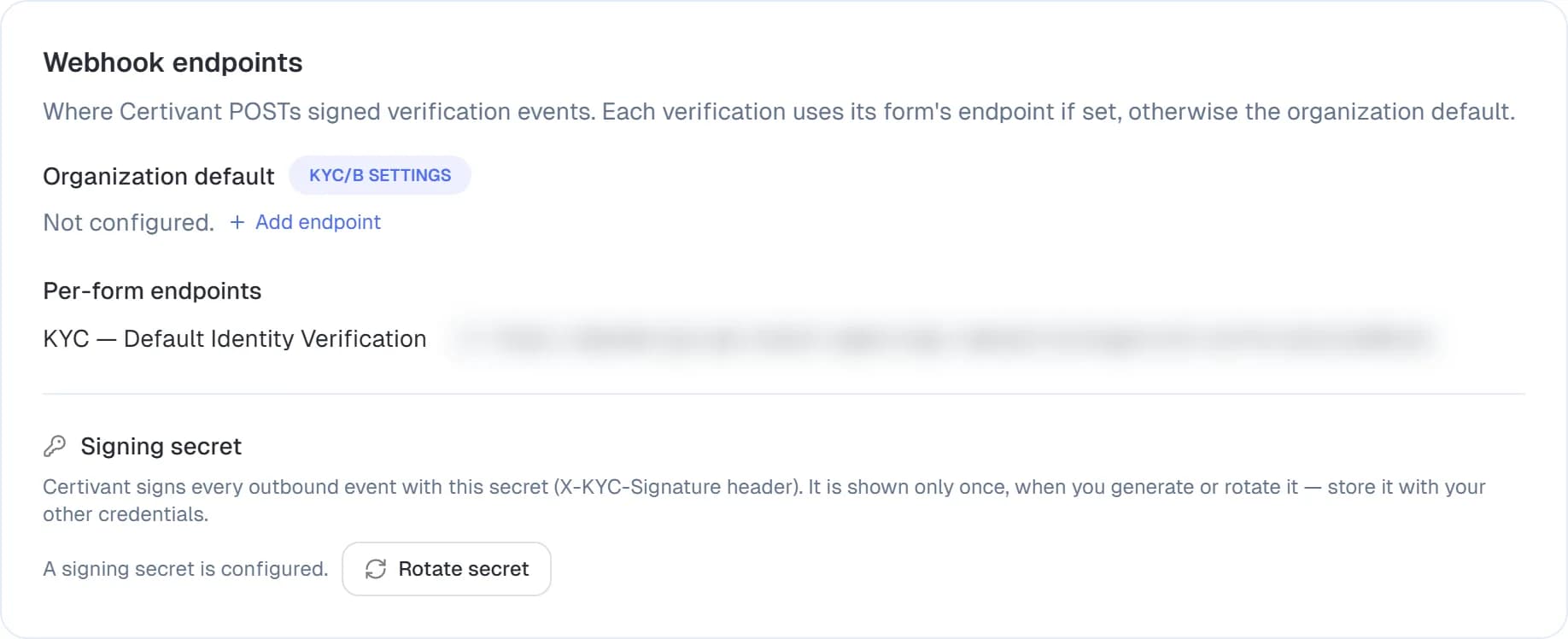
KYC → Webhooks → Add endpoint. A field opens in place: paste the URL and click Save (the same URL can be edited later in Settings → KYC/B). The Webhook endpoints card shows the organization-wide default endpoint, any per-form endpoints, and the signing secret.
Copy the signing secret
After saving you'll see a one-time-shown signing secret. Copy it now — it's not displayed again. If you lose it you rotate to a new one.
Verify signatures on your side
Every request has an X-Certivant-Signature-V2 header of the form t=<unix time>,v1=<hex>. The v1 value is the HMAC-SHA256 of the unix time, a dot and the raw request body, signed with the secret you just copied. Verify it, and reject events whose time is more than five minutes away from your own clock, before parsing. The recipe, with code in several languages, is in the developer guide.
The old body-only X-KYC-Signature-Legacy header is no longer
sent (it was removed on 24 October 2026). If your receiver still
checks it, every event now fails verification — switch to
X-Certivant-Signature-V2.
Pseudocode:
const sig = req.headers["x-certivant-signature"];
const expected = hmac("sha256", secret).update(rawBody).digest("hex");
if (!timingSafeEqual(sig, expected)) return 401;
Don't skip this. Without signature verification, anyone who guesses your endpoint URL can post fake events at you.
Test from the dashboard
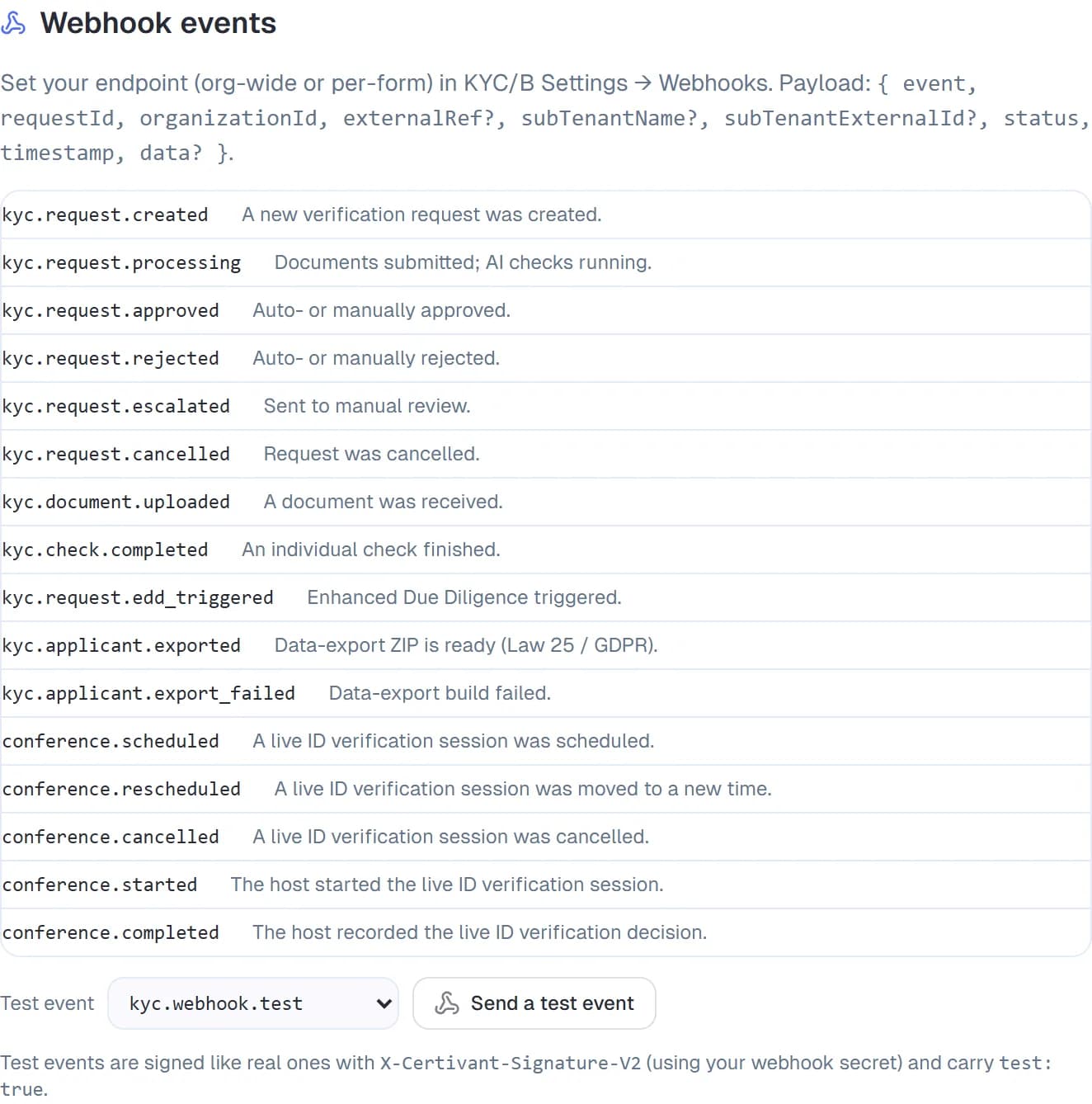
On the Developer page, open the Webhook events section. Pick an event in the Test event dropdown — kyc.webhook.test (the default), kyc.request.created, kyc.request.approved, kyc.request.rejected or kyc.request.escalated — and click Send a test event. Certivant sends a synthetic event to your endpoint, signed exactly like a real one (X-Certivant-Signature-V2, using your webhook secret) and carrying test: true so you can tell it apart. Confirm your endpoint answers with a 2xx.
Event types
| Event | When |
|---|---|
kyc.request.created | Anyone created a verification request (dashboard, API, or public form). |
kyc.request.documents_ready | The applicant uploaded all required documents; processing started. |
kyc.request.approved | Final status is APPROVED (auto or manual). |
kyc.request.rejected | Final status is REJECTED. |
kyc.request.escalated | Sent to manual review. |
kyc.request.cancelled | A reviewer cancelled the request before completion. |
kyb.* | Same shape as kyc.* but for business verifications. |
monitoring.alert.created | A new monitoring alert fired on a previously-approved applicant. |
monitoring.alert.resolved | A reviewer resolved an alert. |
form.submitted | A public-form submission. Useful when you're using the form for non-KYC data collection. |
webhook.test | The synthetic test event from the Test button. Always ships, regardless of subscriptions. |
The full list and JSON payloads are documented under KYC → Developer → Webhook events.
Payload shape
Every event has the same envelope:
{
  "id": "evt_2k3f9a...",
  "type": "kyc.request.approved",
  "createdAt": "2026-05-27T14:30:00Z",
  "organizationId": "org_abc123",
  "data": { /* event-specific payload */ }
}
The data field varies per event type. For example, kyc.request.approved ships:
{
  "request": { "id": "kyr_...", "status": "APPROVED", "type": "INDIVIDUAL", ... },
  "applicant": { "id": "ka_...", "fullName": "Jane Doe", "email": "...", ... },
  "decision": { "by": "auto" | "manual", "reviewerId": "user_..." | null, "note": "..." | null },
  "policy": {
    "id": "pol_..." | null,
    "name": "default-kyc-policy",
    "version": 3 | null,
    "isDefault": true,
    "decision": "approve" | "reject" | "escalate" | "live_verification",
    "rulesFired": ["tier1-disqualified", "approve-by-score"],
    "reason": "High-risk country",
    "liveVerificationRequired": true
  }
}
The policy block (on kyc.request.approved / rejected / escalated) tells you which risk policy decided the request and which rules fired. isDefault: true means Certivant's default policy ran (id/version are your organization's default-policy row, or null when it hasn't been created yet); a custom policy reports its stored id, name, and version. rulesFired lists the rule ids that matched, in evaluation order — branch your downstream automation on these. reason is the winning rule's reason when it set one. decision: "live_verification" (with liveVerificationRequired: true, on kyc.request.escalated) means the policy wants a live ID verification before a final decision — the request waits in manual review until the call decides. See Design a risk policy.
If you operate in partner mode (one org serving many end customers), every event envelope also carries subTenantName and subTenantExternalId — the tags set on the request when it was created via the API — so your handler can route the result to the right end customer. See the developer webhook reference for the exact field placement.
Retries
If your endpoint returns non-2xx (or times out), we retry with exponential backoff:
attempt 1: immediately
attempt 2: 30 seconds later
attempt 3: 5 minutes later
attempt 4: 30 minutes later
attempt 5: 2 hours later
attempt 6: 6 hours later
attempt 7: 24 hours later
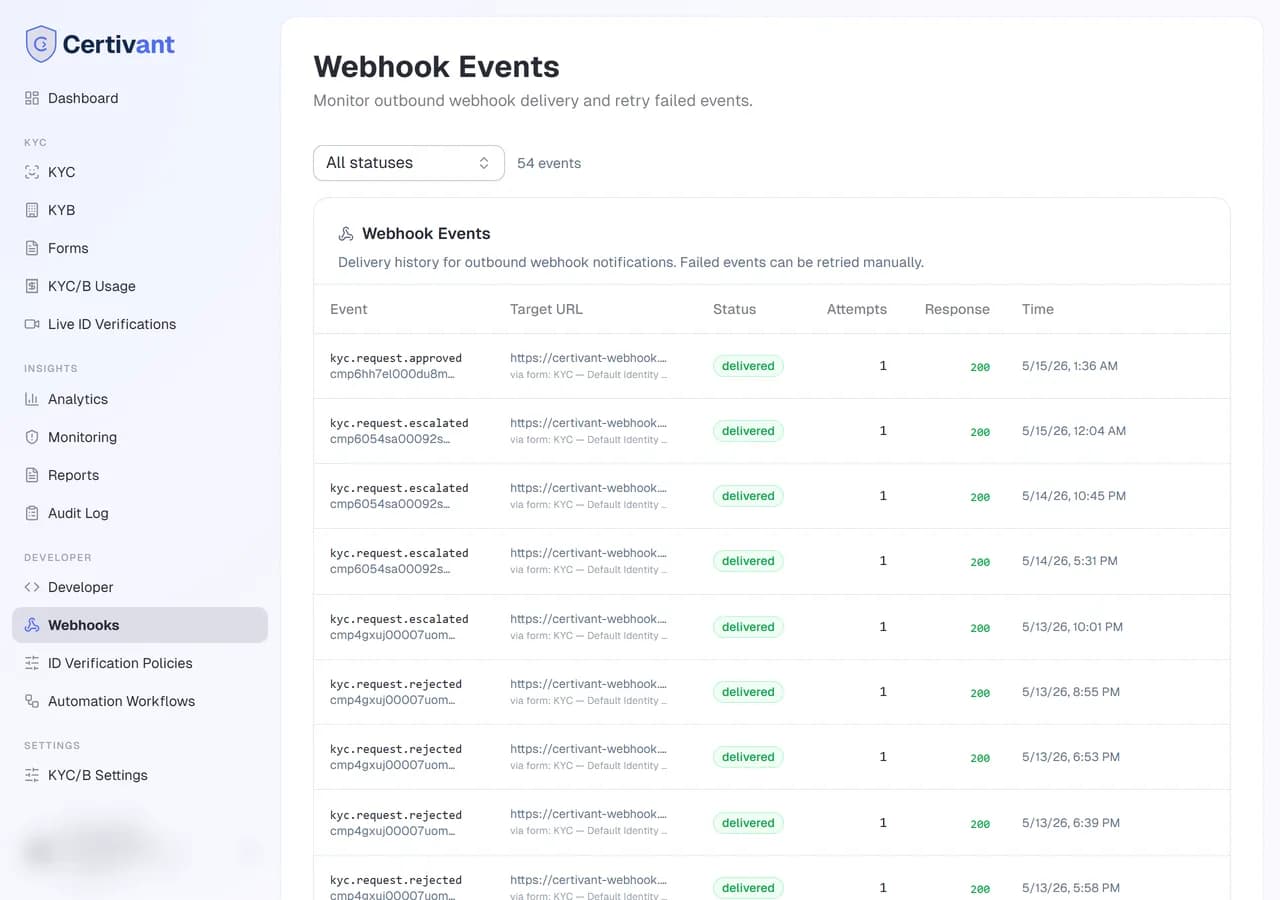
After 7 failed attempts we mark the event as permanently_failed and stop retrying. Failed events appear in the webhooks dashboard with their last error; you can manually re-fire any of them with Retry.
Your endpoint must be idempotent. We don't deduplicate retries
on our side — your endpoint will see the same event multiple times
if its early attempts timed out but eventually succeeded. Key off
the event id and skip if you've already processed it.
Multiple endpoints
You can register multiple endpoints (e.g., one for your CRM, one for your AML data lake). Each can subscribe to a different set of event types. Per-endpoint signing secrets — rotating one doesn't break the others.
Per-form webhooks
The org-wide webhook fires for every relevant event. Public forms can ALSO have a per-form webhook URL under their settings — useful when one form feeds a separate system. Per-form webhooks run in addition to the org-wide ones.
The KYC → Webhooks page now lists both in one place: your organization webhook URL at the top, and a row for each form's webhook URL below it — so you can see every place events are delivered without hunting through individual form settings.
The webhooks dashboard
KYC → Webhooks lists every endpoint with:
- Endpoint URL + friendly name.
- Status — active / paused / failing.
- Last delivery — when the most recent event was POSTed.
- Success rate — % of attempts that returned 2xx in the last 7 days.
- Recent deliveries — table of recent events with status code, latency, and response body.
Pause an endpoint to stop deliveries without losing the config.
Troubleshooting
My endpoint is getting hammered
Endpoints are called once per event, but a busy org might fire dozens per minute. Make your endpoint async — accept the POST, ack 2xx immediately, process the payload off the request lifecycle. If you need to slow us down, set the per-endpoint Max concurrent deliveries option.
Signature verification keeps failing
Three common causes:
- Parsing the body before verifying the signature. Use the raw bytes. Express +
body-parserusers: setbodyParser.raw({ type: 'application/json' })for the webhook route specifically. - Wrong secret. Rotate and re-paste.
- Stripping or transforming the body in a middleware (gzip, BOM, encoding). The signature is over the exact bytes we sent.
Events look duplicated
Retries on slow responses. Key off event.id for idempotency.
Order of events matters but I'm seeing them out of order
We don't guarantee strict ordering across event types. For per-applicant ordering use the createdAt field on the event; the order within a single applicant's lifecycle is monotonic.
Related
- Audit log — every webhook fire is also logged here.
- Developer (API keys) — if you want to pull state via REST instead of receiving pushes.
- Forms — preview & publish — per-form webhooks.
Live ID verification
Schedule, run, record, and replay browser-based live video verification sessions in Certivant — no app download required for applicants.
Developer — API keys & REST API
Issue and manage API keys, configure scopes, and use the Certivant REST API to create verification requests and sync KYC status programmatically from your own systems.