Reused Verifications
Accept a verification an applicant already completed with another Certivant organization — with their consent, without repeating the checks — and let your own applicants share theirs.
What it does
An applicant who already passed an approved verification with one Certivant organization can let another Certivant organization reuse it. The second organization receives a new verification, already approved, with copies of the applicant's data and documents — nothing is shared by reference, and the applicant has to agree first.
It works for individuals (KYC) and for businesses (KYB). The two are switched, aged and priced separately, and a verification can only be shared as its own kind: an individual verification can't be reused for a business, nor the other way round.
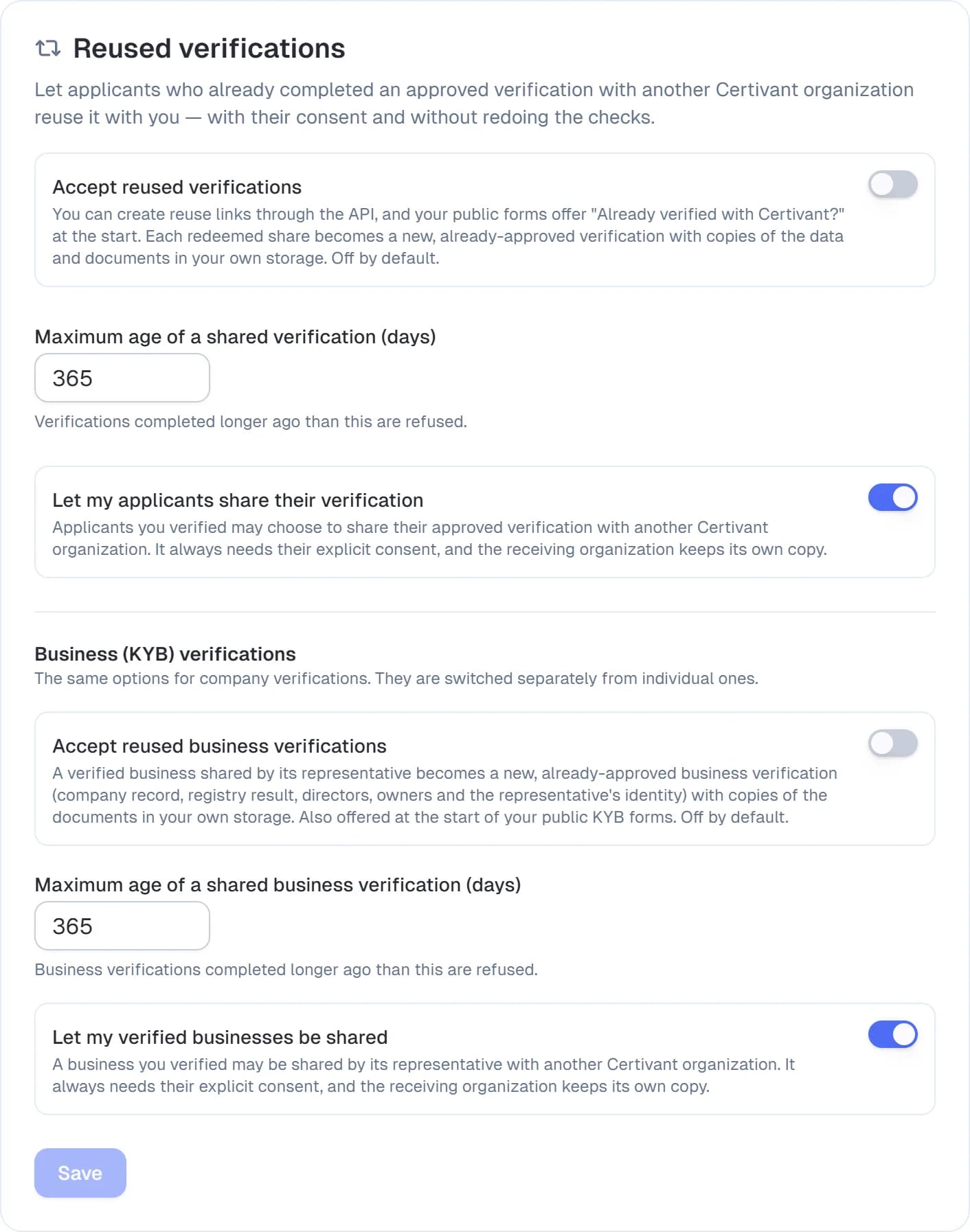
Two roles, both set on Settings → KYC → Reused verifications (one block for individuals, one for businesses):
- Receiving organization — you accept reused verifications (needs the Reused Verifications plan feature) and choose how old a source verification may be.
- Source organization — your own applicants may share their approved verification elsewhere. This is on by default and works on every plan; switch it off if your policy doesn't allow it.
Two ways in
- A reuse link you create through the API and give to the applicant (below).
- Your public forms. When you accept reused verifications, your public KYC form offers "Already verified with Certivant?" at its start (a KYB form offers the business version). See On your public forms.
How a reuse works
- Your system creates a reuse link through the API (
POST /api/v1/kyc/reuse/invitations, withtype: "BUSINESS"for a business) and gives it to the applicant. - The applicant opens the link and finds their earlier verification: they enter its verification ID, and Certivant emails a 6-digit code to the address on that verification. Only the real owner can read it.
- The applicant sees who verified them, when, and what would be shared — their verified identity details and copies of their identity documents — and agrees with "Share my verified identity with your organization's name". They can decline; nothing is sent.
- Consent creates a single-use share token. It works for 30 minutes by default (you can set 1 minute up to 24 hours) and only for your organization. If you gave a redirect URL, the applicant's browser returns to it with the token.
- Your system redeems the token (
POST /api/v1/kyc/reuse/redeem). A new verification appears in your queue marked "Reused from a Certivant verification".
What you receive
An individual verification
- The applicant's verified details (name, date of birth, nationality, email, phone) and the extracted document fields.
- Copies of the document files, written to your own storage under your own keys. If your organization keeps no documents after a decision (delete documents after decision), the files aren't copied — only the data.
- The verification's validity date. When it lapses, your usual re-verification rules apply.
A business verification (KYB)
- The company record: name, registration number, country, company type, registry link and the registry result.
- The directors and the beneficial owners with their ownership percentages and status. The separate verifications the source organization ran for each owner are not shared; you can verify owners yourself as usual.
- The representative's verified identity (the person who proved ownership and consented) and how they were matched to the company's directors, plus the authorization document when one was provided.
- Copies of the company and identity documents, under the same storage rules as above.
You don't receive the source organization's name, its reviewer notes, the raw provider results or the capture proof.
What can stop a reuse
The share is refused — with a clear message to the applicant or in the API response — when:
- the source verification wasn't approved, has expired, or isn't the same kind (individual or business) as the link;
- it is older than your maximum age for that kind (default 365 days);
- the source organization has switched sharing off for that kind;
- the two organizations keep data in different regions (storage region, database region or AI-processing residency). Data never crosses a residency boundary through a reuse.
On your public forms
When you accept reused verifications for a kind, a public form of that kind starts with a card: "Already verified with Certivant?" (for a KYC form) or "Already verified your business with Certivant?" (for a KYB form). It is not offered on a link someone sent you to complete a pending verification, on a form with other types (for example a combined KYC + KYB form), or when your organization can't accept verifications right now.
- The applicant chooses Reuse my verified identity / business, enters the ID of their earlier verification and the 6-digit code emailed to the address on it, then reads who verified them and what would be shared and agrees. Same proof and consent as a reuse link.
- The form is pre-filled from the shared verification (name, date of birth, nationality, email, phone — and, for a business, the company fields). The email address they just proved counts as verified. They can review and correct every value, and the form no longer asks for documents.
- They submit. The submission is filed against the new, already-approved reused verification, and the form's usual consent and privacy-policy steps still apply. Workflows bound to the form run as for any submission.
A form protected by a secret key keeps its protection: the option only appears for someone who opened the form with its key. The applicant can always choose Fill in the form myself instead.
Reusing through a form is billed like any other reuse (see below). Verifications created this way are attributed to the form, so an API key restricted to that form can see them.
Cost
Reusing is free by default. A super admin can set a Reused verification price and a separate Reused business verification price in Billing Prices (or a per-customer price); each is charged to the receiving organization once per redeemed share.
Audit
Both organizations get audit entries: the source records the applicant's consent and where the data went; the receiving organization records the invitation, the consent it received and the redeemed copy.
Related
Document Types, Expiry & Recency Settings
Choose which identity and business documents Certivant accepts, set how old a document may be, and decide what happens when a document is expired, too old, or its date can't be read — for both KYC and KYB.
Billing & credits
Manage your Certivant subscription, buy pay-as-you-go credits, understand trial expiry and billing states, and resolve invoices and payment issues.